
Peak Forms · Reports
See where your
form loses people.
Peak Forms counts views, starts and completions and shows the question after which people stopped. So you know what to improve first.
What should your form clarify?
Points for fit, need, urgency and decision
The numbers come from real responses only. Test runs and spam don't count.

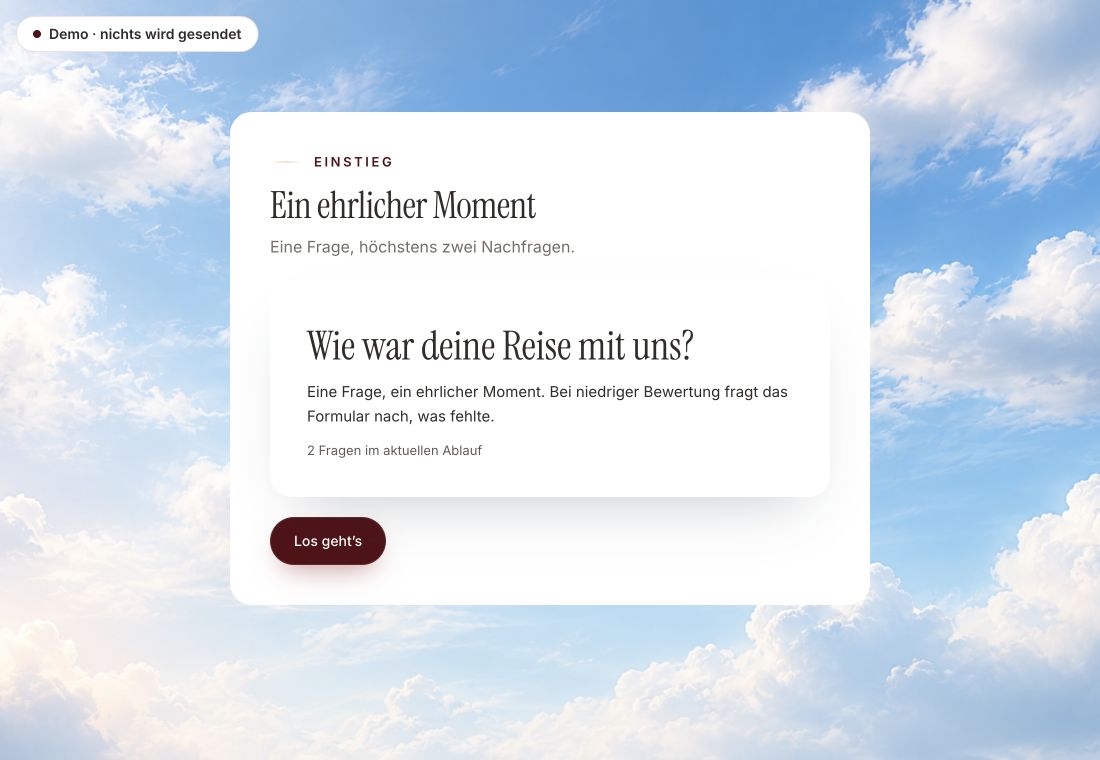
- Original product player
- Try without an account
- No answer saved
01 / Experience the product
Don't just look. Answer yourself.
The customer voice runs in the real Peak Forms player. A low rating opens an additional follow-up.
Original capture · 26 October 2026 · Product demo No saving, no workspace, no activation.
How to use the report
Measure first, then change one thing.
The overview only calculates rates where the basis is sound. Where it is missing, no estimated value is shown.
- 01 / One report
Publish the form
The report starts with the first real response. Test runs from the preview are not included.
Inquiry form · 30 daysStarts: 120Submitted: 84 · completion rate 70%Qualified: 31 of 84 - 02 / What you see
Find the biggest drop-off
Under Optimize, forms with the most starts are on top, with their most frequent drop-off point.
Four questions the numbers answer.How many complete?Where do people stop?How many fit? - 03 / Responses & reports
Improve on purpose
Change that one question, publish a new version and compare the next period.
30 days of an inquiry form.Metrics from the Peak Forms report



Trust needs clarity
Clear about what happens here.

Scope of this preview
- 01What the report can't do
- Anonymous page views are not people, so there is no view-to-start rate as a conversion rate. Custom chart dashboards and scheduled reports by mail don't exist in Peak Forms; for further analysis you export responses as CSV.
- 02Inquiry form · 30 days
- Fictional numbers for illustration. They are neither customer results nor benchmarks.
- 03A safe demo
- Test answers stay in the demo. They are neither saved nor taken into your workspace.
The next step
Improve what you can measure.
Publish your first form and see where it gets stuck after the first responses.
Start free in Peak FormsThe numbers come from real responses only. Test runs and spam don't count.
Frequently asked questions
Do my test responses count?
No. Responses from the preview are marked as tests, and submissions recognized as spam are excluded as well.
What happens when I change the form?
Each publish is its own version. Drop-offs are attributed to the version the person actually saw.
Are there benchmarks for my rate?
No. Peak Forms compares you with your own history, not with made-up industry values.