
Peak Forms · Form page
A page that wants one thing:
the answer.
Every published form gets its own public page in Peak Forms. Title, intro, your colours and fonts and a calm or moving background turn it into a landing page you link straight from an ad, a post or a QR code.
What should your form clarify?
Points for fit, need, urgency and decision
The link stays the same even when you publish a new version.

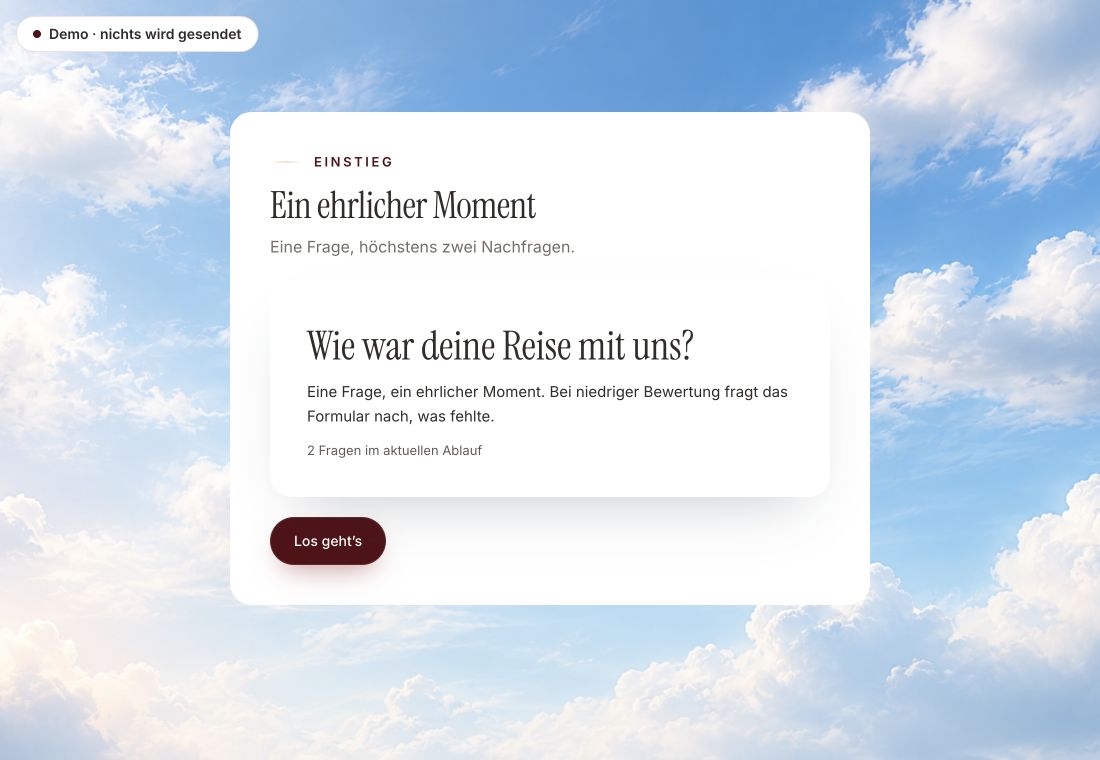
- Original product player
- Try without an account
- No answer saved
01 / Try the player
A form in the real Peak Forms player.
The example is the customer voice in the real Peak Forms player. A form page shows your form with title, intro and your brand.
Original capture · 26 October 2026 · Product demo No saving, no workspace, no activation.
02 / How it works
A form page in three steps.
A fictional gym links its ad to the form page. No menu, no distraction, just three questions and then the fitting slot.
- 01 / Form
Build the form
Write the questions, title and intro.
The page is the form.QuestionsTitleIntro - 02 / Style
Style it
Apply the brand, choose presentation and background.
Your brand, your presentation.Logo, colours, fontsImage or video as backgroundSound never starts by itself - 03 / Liên kết
Publish and link
Publish and place the link in an ad, a post or a QR code.
A stable public link.AdPostQR code



Trust needs clarity
Clear about what happens here.

Scope of this preview
- 01The link stays the same
- The address has its own public ID, not the internal one. New versions do not change the link.
- 02A safe demo
- Test answers stay in the demo. They are neither saved nor taken into your workspace.
- 03What the form page is not
- The form page has no freely designed sections such as image galleries, pricing tables or a menu; it shows title, intro and the form. Your own domain is planned. For full landing pages with several sections, Peak One has a separate app.
The next step
One link, one page, one answer.
Build your form page in your browser, without an account.
Start in your browserThe link stays the same even when you publish a new version.
Frequently asked questions
Do I need my own website?
No. The form page works on its own. If you have a website, you can also embed the form there.
Does the page work on a phone?
Yes. Form and background adapt, and moving backgrounds have their own portrait version.
Does the link change with a new version?
No. The public link stays the same; new responses belong to the new version.